
APPA Help Center
Below you'll find useful information and best practices.
Welcome to our Help Center! Below you'll find useful information and best practices. Learn how to utilize your Member Compass to access virtual course materials, event registration tools, and more. Follow the links below to find out how you can make the most of your APPA membership.
Membership Perks, Discounts, & Pricing
APPA membership unlocks discounted pricing across events, professional development programs, certification exams, bookstore purchases, and more — and in most cases, your discount is applied automatically when you're logged in.
To ensure member pricing is reflected at checkout, always make sure you are signed in to your Member Compass account before registering for events or making purchases. Occasionally, additional discounts are offered via promotional codes — these will be communicated through the InsideAPPA newsletter or event-specific communications, and can be entered at checkout where indicated.
If a discount doesn't appear as expected, verify that your membership is active and that your account is correctly associated with your organization. If you believe there is an error, contact member services before completing your purchase, as dues and registration fees are non-refundable.
Learn The Member Compass
Once logged into the website, you will be redirected to your Member Compass. Along with information about your current membership status, you’ll also see several tabs to the left including your profile and account history. You may also see dynamic information boxes that show the current number of upcoming events you’re registered for, or a box displaying how many outstanding invoices you have. Note: if you are not registered for any upcoming events or do not have outstanding invoices, that corresponding information will not display.
These features allow you to manage your membership information conveniently and efficiently. Keeping your profile up to date in the Member Compass ensures your membership is in good standing and that you have access to all the benefits we provide to our members.
View our webinar on how to navigate the new tools, hosted by Chief Operating Officer, David Ulmer:
Technology That Works for You: APPA’s Member Experience Upgrade
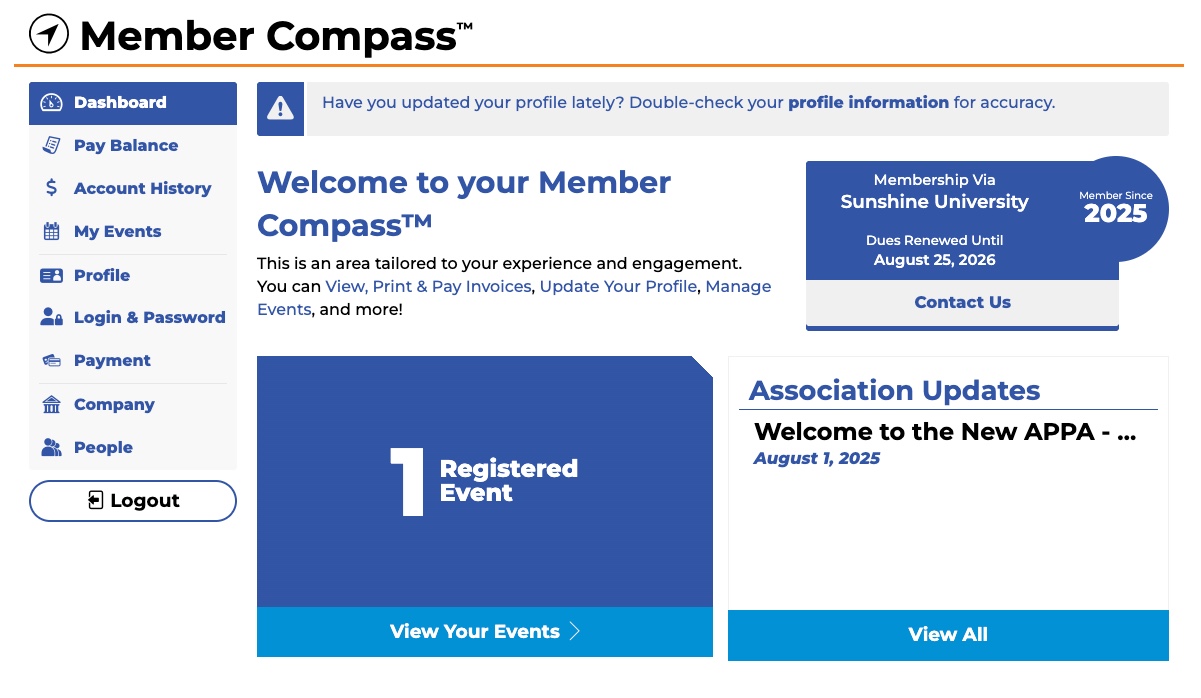
Dashboard
This serves as the home page for your Member Compass. You can click this at any time to get back to this main screen.
Membership details such as expiration date, member name, and member since are shown in the top right corner.
Pay Balance and Account History
To pay open invoices select the Pay Balance tab. Need to view past transactions, or print an invoice? Go to the Account History tab. From there you can get detailed information on your invoice history. Instead of having to call or email staff to make a payment or send an invoice, you can find those here. All membership dues are non-refundable.
For details on Membership Dues and how they are calculated, please visit our Understanding APPA Membership Dues page.
All invoices are in USD.
My Events
At the top of this tab are any upcoming events you’re currently registered for. To the right of each event is a link that will allow you to add it to your calendar (iCal, Google, Outlook, and others.) Below that section lists past events.
All event registrations are subject to our Event Cancellation Policy.
Continuing Education Tab
Here you'll see any continuing education credit you've earned with APPA (as of the new website launch). You can also run a Continuing Education Report for a set time frame to see all credits in one transcript.
Profile
Upload your headshots, links to social media profiles, and any other information you’d like to share with other APPA members here. When you update your profile information within the Member Compass, that will update what appears on your individual directory listing.
Login & Password
Need to update your password? Easily update your login credentials here.
Payment Methods
Add or edit your saved payment methods here (if applicable).
My Orders
If you have made any purchases from our store, those order details will be available here.
Company/People
If you see the words Company and People in your sidebar, your account has access to update the organization profile. The Primary Contact, Billing Contact, and anyone on staff with Management Access can update the information found here. This includes the logo, contact information, staff list, website, address, description, etc. Changes made here will be reflected on the organization's Member Directory listing as well.
Is APPA Membership Individual or Institutional?
APPA membership is held at the organizational level, and individuals inherit membership from their employer's group account.
For Institutional members, when your institution or company joins APPA, all staff added to your roster are covered under that membership.
For Business Partners, member benefits are managed by seats. While seat assignments are not required to create a personal login, a seat must be assigned to an individual to access member benefits.
If you are unsure whether your employer is already an APPA member, search for your organization in the Membership Directory.
To add yourself to an existing membership, click the "Join" button on any www.appa.org web page or ask your organization’s Primary Contact or someone with Management Access to add you via the People tab in the Member Compass.
Membership Renewals
APPA memberships renew annually. Renewal invoices are automatically generated 75 days in advance of your membership expiration date, and reminders will be sent to your organization’s Primary Contact and Billing Contact via email. To complete your renewal, log in to your Member Compass and navigate to the Pay Balance tab to complete payment.
Memberships past due more than 60 days will be automatically terminated.
If you have questions about your renewal or have not received a reminder, contact Membership support:
Contact Us
Membership Verification Letters
If you need confirmation of your organization’s APPA membership status, for example, for employer reimbursement or professional documentation purposes, contact Membership support with your request.
Please include your name, organization, and the purpose of the verification.
Managing Profiles, Rosters, and Contact Information
Any logged-in user can see their Dashboard, which includes their membership status, personal profile information, event registrations (current and past), plus any orders and transactional history. You may see organization information if your account is granted certain access permissions.
Primary Contacts, Billing Contacts, or users designated with Management Access can update organization information, such as contact information, staff, and organization profile fields.
How to Add or Remove Staff from Your Membership
To manage your team’s roster, please follow the below steps. Changes take effect immediately:
- Log in to your Member Compass
- Navigate to the People Tab
- Add/Remove/Update staff as necessary
To manage your Company Information:
- Log in to your Member Compass
- Navigate to the Company Tab
- Update fields as needed
To view invoices and pay bills:
- To pay your bill, please login to your Member Compass then visit the Pay Balance tab.
- To view company account history, or print an invoice, visit the Account History tab.
Keeping your staff roster up to date ensures your team members have access to the benefits included in your institutional membership. Only your organization's Primary Contact, Billing Contact, or users with Management Access can add or remove staff — if you need access and don't have it, contact your Primary Contact or contact member services.
Who Is My Organization's Primary Contact?
To locate your team's primary contact, search for your organization name in our Membership Directories, select your organization, and locate the Primary Contact information within your organizational listing.
How Do I Update Contact Information?
To update your personal contact Billing and Shipping details, visit the Profile tab in your Member Compass.
To update your Organization's Billing and Shipping details, visit the Company tab in your Member Compass.
Changes take effect immediately.
How Do I Manage Membership Seats? (Business Partners Only)
Membership seats must be assigned to a Business Partner team member to access member perks.
Assigning Seats
When logged into Member Compass, the primary contact of a company, billing contact, or a person with management access can view the "People" list of their direct parent company. These individuals can see:
- The total number of seats available and how many have been assigned.
- Each person's membership status, including who has a seat.
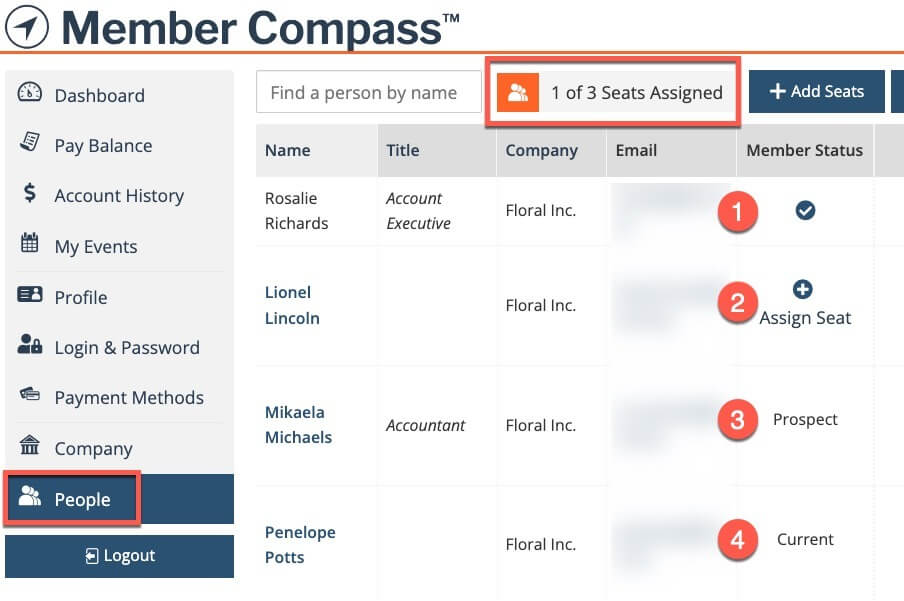
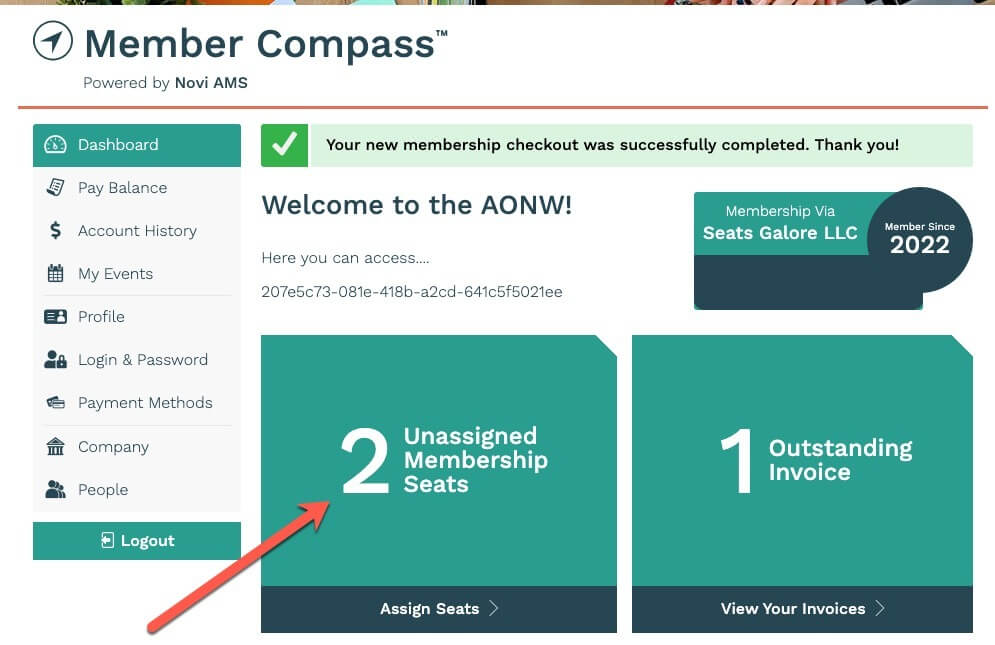
If any seats are unassigned they will also see an alert message on their Member Compass Dashboard. Clicking the tile for Unassigned Membership Seats will take the user to their People tab so they can assign the seat(s).
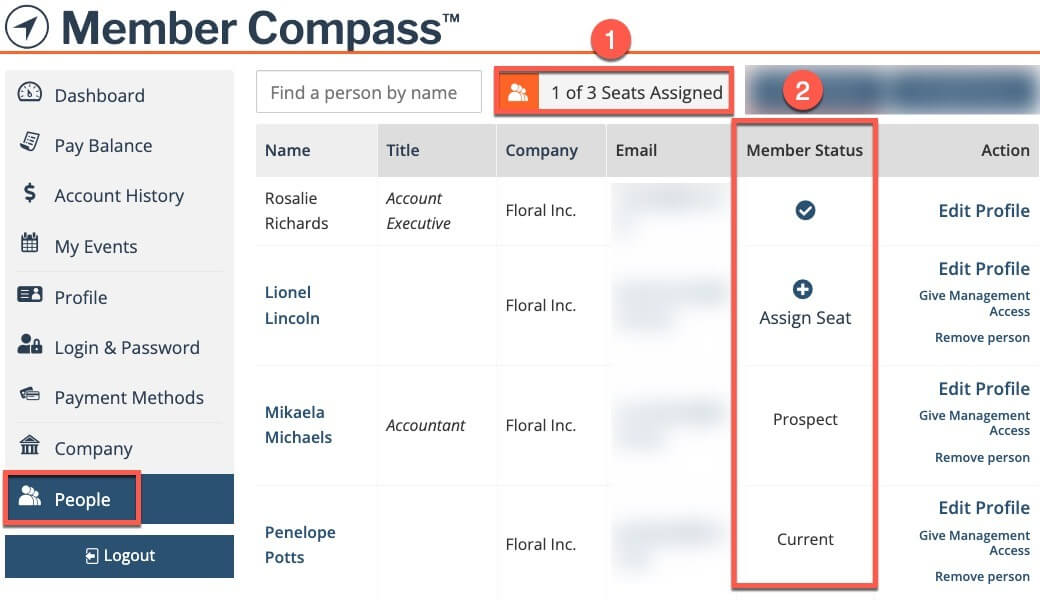
A person's Member Status could appear as any of the following:
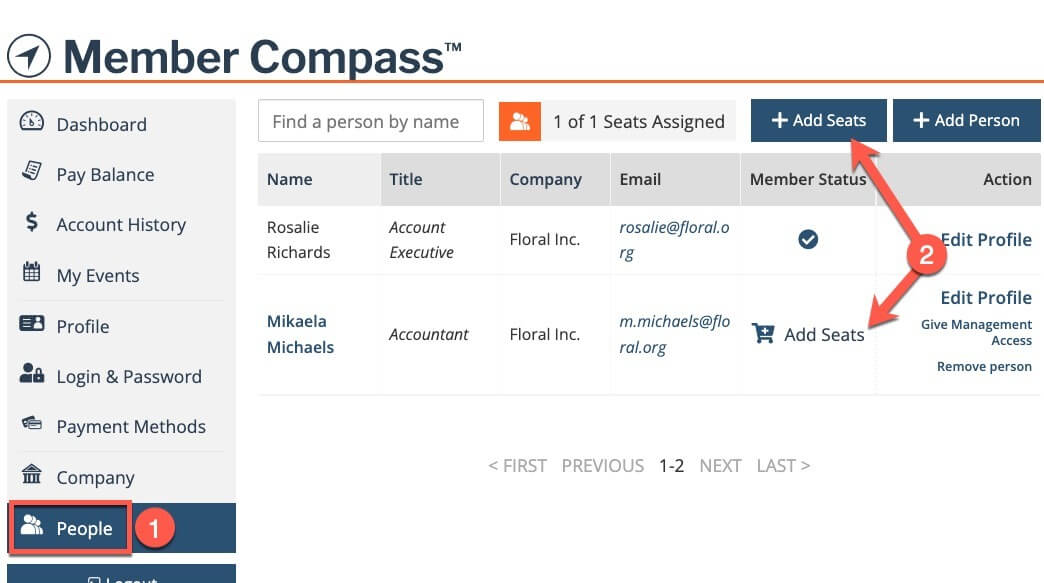
Checkmark = Inheriting
(#1 in the image below)
Individuals who are assigned a seat and are therefore receiving benefits from their company.
These people do not pay their own dues - they "inherit" benefits from their parent company. (This company's status is either Current or Grace Period.)
Plus Sign with "Assign Seat" = Non-Member
(#2 in the image below)
Individuals who are not receiving benefits from their company, but there is an available seat that could be assigned to this person.
If the seat is assigned, the individual will then have a checkmark (see above):
Assigning Seats
To assign a seat, simply click the "+" icon next to a person's name and they will immediately begin inheriting member benefits.
Reassigning Seats
To reassign a seat from one person to another person in the family, a user with management access can:
- Go to the People tab in the Member Compass.
- Click the "Remove person and unassign seat" link in the Action column (on the right). This will remove the person from the family. They will still have a non-member record in our database but they will no longer be connected to your family of records. This cannot be undone by a manager.
- Once a seat is available, find the new person who should have the seat, and click "Assign Seat" in the Member Status column.
Adding Seats
To add more seats to a current company's membership, a user with management access can go to the People tab in their Member Compass and click the Add Seats button at the top of the list, or they can also click the link in the Member Status column if there's already a person record listed that doesn't have a seat assigned yet.
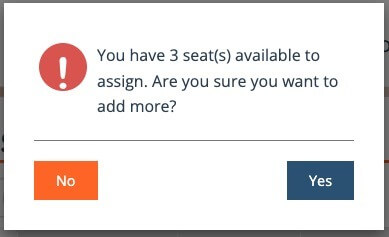
If you already have unassigned seats available when clicking the button to add more seats you will see a warning message like this one:
Reduce Total Number of Seats
Members must reach out to association staff to reduce the total number of seats on their company's membership. This includes edits to open Dues Invoices - only admins can remove seats/people from a dues invoice.
Membership Directories
APPA's Membership Directory provides an always-current list of active Institutional and Business Partner members. Find peers in your area using the Map feature or connect with Primary Contacts for any member organization.
APPA Institutional Member DirectoryAPPA Business Partner Directory
How Do I Update My Organization's Listing?
Your directory listing is the primary way other APPA members find and learn about your organization, so keeping it current is important. To update your listing, log in to your Member Compass, navigate to the Company tab, and update any relevant fields including your organization's name, contact information, website, description, and logo.
Changes are reflected in the directory immediately. Note that only your Primary Contact, Billing Contact, or users with Management Access can edit organization information — if you need access, contact your Primary Contact or Member Services.
International Alliance Member Setup Guide
As an institutional member of HEFMA, TEFMA, or AUDE — APPA's International Alliance Partners — you can create a free APPA account to access a range of complimentary Alliance Membership benefits. Restricted to International Alliance Member institutions only. This guide walks you through the account creation process.
APPA Regional Memberships
APPA is organized into six geographic regions — PCAPPA, RMA, CAPPA, MAPPA, ERAPPA, and SRAPPA.
Regional memberships are included in all Institutional memberships and are automatically assigned during the onboarding process based on your institution's location. Regional membership provides you with discounted registration for regional events, access to chapter-level training and programming, and volunteer opportunities within your local facilities community. To find your region or learn more about regional events and chapters, visit the Regions & Chapters page.
Business Partners enjoy a number of Regional memberships based on the partnership tier selected. Regional membership gives Business Partners the ability to engage with institutional members through exhibit and sponsorship opportunities at regional conferences — a valuable way to build relationships in specific geographic markets. If you have questions about your regional membership status or would like to add more regions to your Business Partner membership, please contact APPA member services.
Membership Tier Modifications
To upgrade or downgrade your Business Partner membership tier, please contact APPA member services — tier changes cannot be processed directly through the Member Compass. Note that all membership dues are non-refundable, so any tier change will take effect at your next renewal unless otherwise arranged with staff.
What Happens If Your Membership Lapses
If your APPA membership expires, access to member-only benefits — including the institutional and Business Partner directories, archived webinars, Body of Knowledge content, and member pricing on events and certifications — will be temporarily unavailable. Reinstating is straightforward: log in to your Member Compass to pay any outstanding balance, or contact member services for assistance.
Events: Registration, Cancellations, Transfers, and Credits
Registering for an Event
To register for an APPA event, visit the Events page and select the event you'd like to attend. Make sure you are logged in to your Member Compass before completing registration to ensure member pricing is applied automatically. Once registered, you can add the event to your calendar (iCal, Google, Outlook, and others) from the My Events tab in your Member Compass. For full details, see APPA's Event Policy.
Registering Multiple Staff for an Event
Company Managers may register multiple staff members for an event in a single transaction during the event registration process. This feature is only available to Primary Contacts, Billing Contacts, and users with Management Access.
- Log in to your Member Compass and navigate to the event registration page.
- By default, your own name will appear as the registrant — if you are not attending, click the X to remove your name.
- Use the Add Registrant drop-down to select additional staff members from your team roster, adding each person individually.
- Member pricing will be applied automatically for each eligible staff member.
- Once all names have been added, proceed to checkout.
Please note that invoicing is not available for event registrations. If you need invoicing assistance, please contact our Accounting team:
Cancellations and Transfers
If you are unable to attend an event, you may be eligible to cancel or transfer your registration to another person within your organization for the same event.
To cancel or transfer a registration, Contact Us as soon as possible with your request.
Transfers must be made in the same calendar year.
Please review APPA's Event Policy for full details on refund eligibility and deadlines.
Accessing Event Content
APPA uses the APPA Events mobile app to deliver event content, including session recordings made available after an event concludes for up to 30 days. Download the app from the Apple App Store or Google Play Store to access recordings and other event resources. If you have trouble accessing content through the app, Contact Us for assistance.
How to Submit a Speaker Proposal for APPA Events
APPA welcomes speaker proposals from Business Partners and institutional members with expertise relevant to the educational facilities community. Speaking opportunities are available at a variety of APPA events including APPAU and the APPA Annual Conference.
To inquire about speaking opportunities or submit a proposal, contact events@appa.org with a brief description of your proposed topic, your relevant experience, and the event you are interested in.
Proposals are reviewed on a rolling basis and subject to program availability.
APPAU
APPAU is our premier professional development event, bringing multiple training programs together at a single location. Attendees can choose from the Institute for Facilities Management that offers four core topic areas covering the breadth of facilities management practice, or the Leadership Academy, a four-course program covering individual, interpersonal, managerial, and organizational leadership skills.
APPAU also offers the T3 Workshop, focused on workforce recruitment, retention, and skill development strategies, as well as an in-person CEFP exam prep course. Registration for APPAU follows the same process as other APPA events. See the Events links below for details.
For event-specific questions, contact events@appa.org.
Professional Development
Programs
APPA offers a range of professional development opportunities designed to support facilities professionals at every stage of their career. For a full overview of all available programs, visit the Professional Development page.
Professional Development Programs
Virtual Courses and Materials
APPA offers many ways to learn. If you are enrolled in virtual courses, they can be accessed at the link below. Members will need to login to their Member Compass to gain access to these materials.
Professional Development Credits and Certificates
All credits and certificates are available digitally in your Member Compass under the Continuing Education tab where certificates can be accessed and printed. Physical certificates are not mailed.
APPA events and programs offer several types of continuing education credits depending on the activity and your professional credentials. Here is a quick overview of each:
- CEU (Continuing Education Unit) — A nationally recognized unit of measurement for continuing education. One CEU equals 10 contact hours of participation in an organized continuing education program.
- PDH (Professional Development Hour) — One hour of approved professional development activity. Commonly required for licensed engineers and other regulated professions.
- LU (Learning Unit) — Used by the American Institute of Architects (AIA) to track continuing education for licensed architects. One LU equals one hour of learning activity.
- APPA Credentialing Unit — APPA’s own unit of measurement used to track professional development activities toward CEFP recertification.
- AIA CLU (AIA Continuing Learning Unit) — A subset of LUs specifically designated for AIA Health, Safety, and Welfare (HSW) requirements.
Credit types available vary by program or event and are noted on each event or course listing.
Credits earned through APPA events and programs are tracked automatically in your Member Compass. To view your credits, log in and navigate to the Continuing Education tab, where you can also run a Continuing Education Report for a specific time frame to generate a full transcript. If you believe a credit is missing or incorrect, Contact Us for assistance:
Contact Professional DevelopmentContinuing Education History
CEFP Certification
The Certified Educational Facilities Professional (CEFP) is APPA's professional credential, recognized across the educational facilities industry as the standard in facilities leadership. To get started, visit the Get Certified page to review qualifications and register for the self-study course, which provides immediate access to all exam preparation materials.
APPA members receive discounted pricing on exam registration and study materials. Make sure you are logged in to your Member Compass before purchasing to ensure discounts are applied. Once certified, credential holders must recertify periodically. Visit the Recertification page for requirements and deadlines.
For certification questions, contact certification@appa.org.
CEFP InformationGet CertifiedRecertification
Webinars
APPA's webinars cover best practices, industry trends, and emerging research in facilities management. Live webinars are free and open to the public. Simply create a login to register. Archived webinars are available to APPA members only. You must be logged in to your Member Compass to access past sessions.
All APPA webinars are recorded and available to members in the Webinar Archive in the link below.
For webinar questions, contact webinars@appa.org.
Body of Knowledge
The APPA Body of Knowledge (BOK) is a searchable digital library of foundational facilities management content, organized across four core areas: General Administration and Management, Operations and Maintenance, Energy and Environmental Stewardship, and Planning, Design, and Construction. It includes more than 60 content chapters, corresponding abstracts, and short video content from APPA subject matter experts. Access is included with all APPA memberships — log in to your Member Compass to get started.
Careers Center Access
Accessing Careers Center Job Postings
Whether you're searching for your next opportunity or looking to hire top facilities talent, the APPA Careers Center connects institutions and professionals across the educational facilities community.
For Job Seekers
Explore open positions at colleges, universities, K–12 schools, and other educational institutions across the country. Roles span operations and maintenance, sustainability, planning and construction, administration, and more.
For Career Center support, contact:
APPA Bookstore Support
Purchasing APPA Digital Books
APPA's digital books are accessible through the Bookstore link located under the Publications drop down menu at the top of any APPA.org webpage. Purchase includes online access to the digital book and any accompanying materials.
APPA digital assets and reports are proprietary and non-transferrable. Access is automatically assigned to the purchaser—you can access your purchased digital books through your APPA account (details available). Digital books are viewable online and are not available for download or printing.
To purchase a Digital Bookstore title:
- Log in to your Member Compass via www.appa.org/login.
- Visit the APPA Bookstore via the link below or the "Bookstore" drop-down under "Publications" on any www.APPA.org web page.
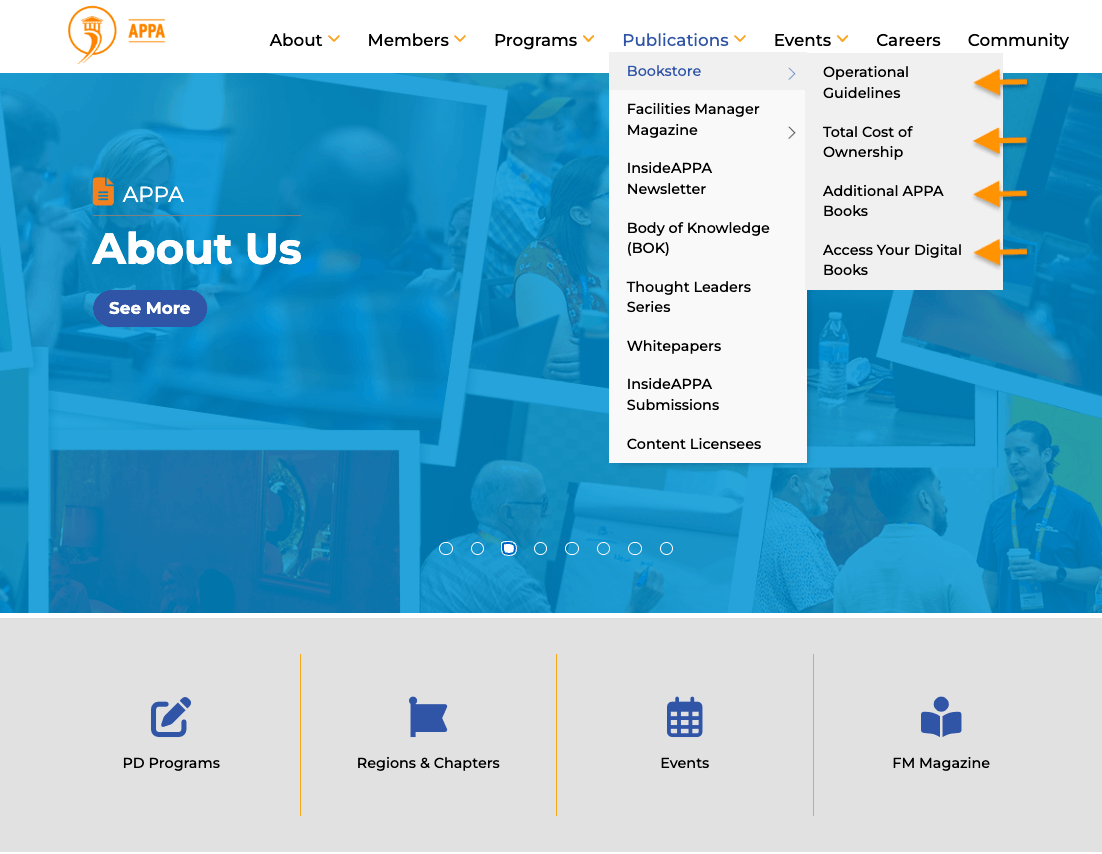
- Select the series you'd like to purchase (Operational Guidelines, Total Cost of Ownership, or Additional APPA Books).
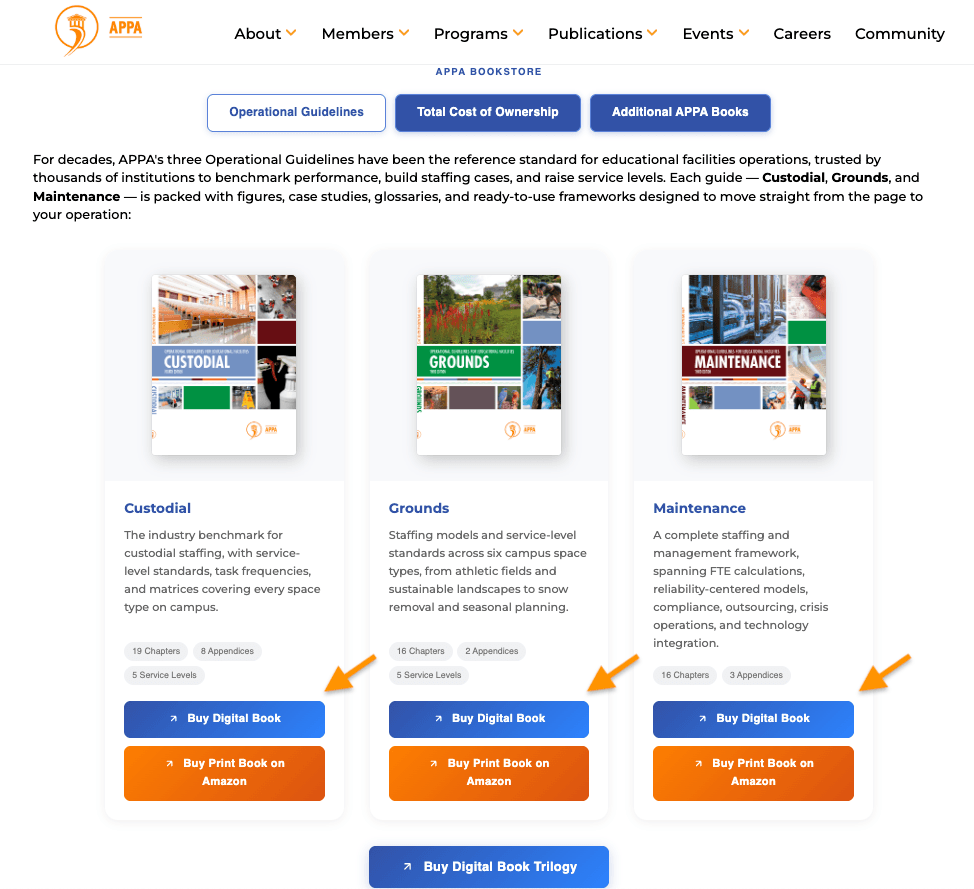
- Select the individual title to be taken to a product page.
- Add the title to your cart and proceed with checkout.
- Once purchased, your receipts will appear in the Account History tab of Member Compass.
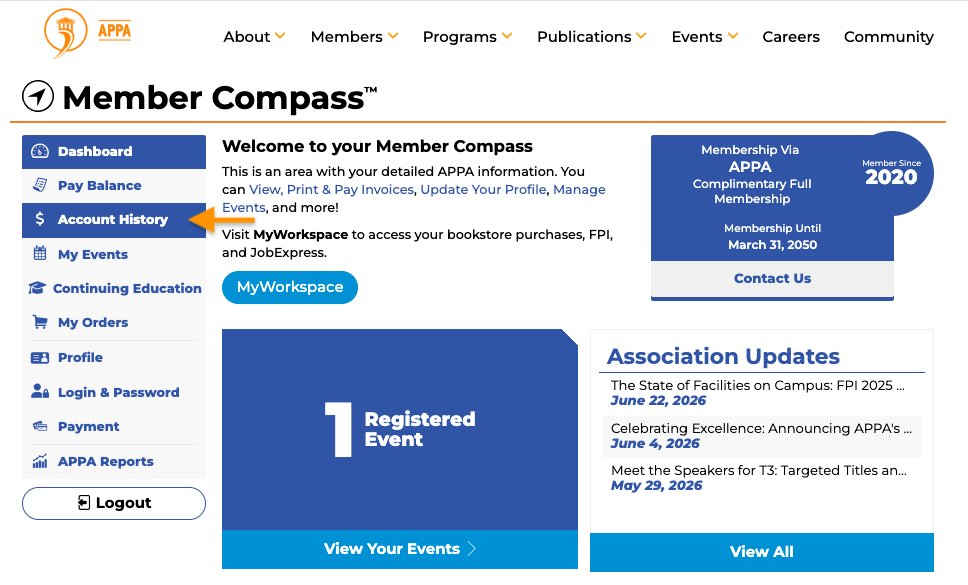
- Access your purchased digital books
APPA BookstoreAPPA Thought Leaders Series
Purchasing APPA Print Books
APPA's print titles are available through our Amazon Bookstore, accessible via the direct link below.
Hard copy titles do not include supplemental digital assets.
Print book purchases and payments are managed through the Amazon bookstore portal and do not connect with APPA's Account History.
Accessing Digital Titles, Resources
Available for digital titles only, APPA digital assets and supplementary materials are proprietary, non-transferrable, non-printable, and non-downloadable. Access is automatically assigned to the purchaser.
To view or access digital e-book or supplemental materials:
- Log in to your Member Compass via www.appa.org/login.
- Visit the APPA Bookstore via the link above or the "Bookstore" drop-down under "Publications" on any www.APPA.org web page.
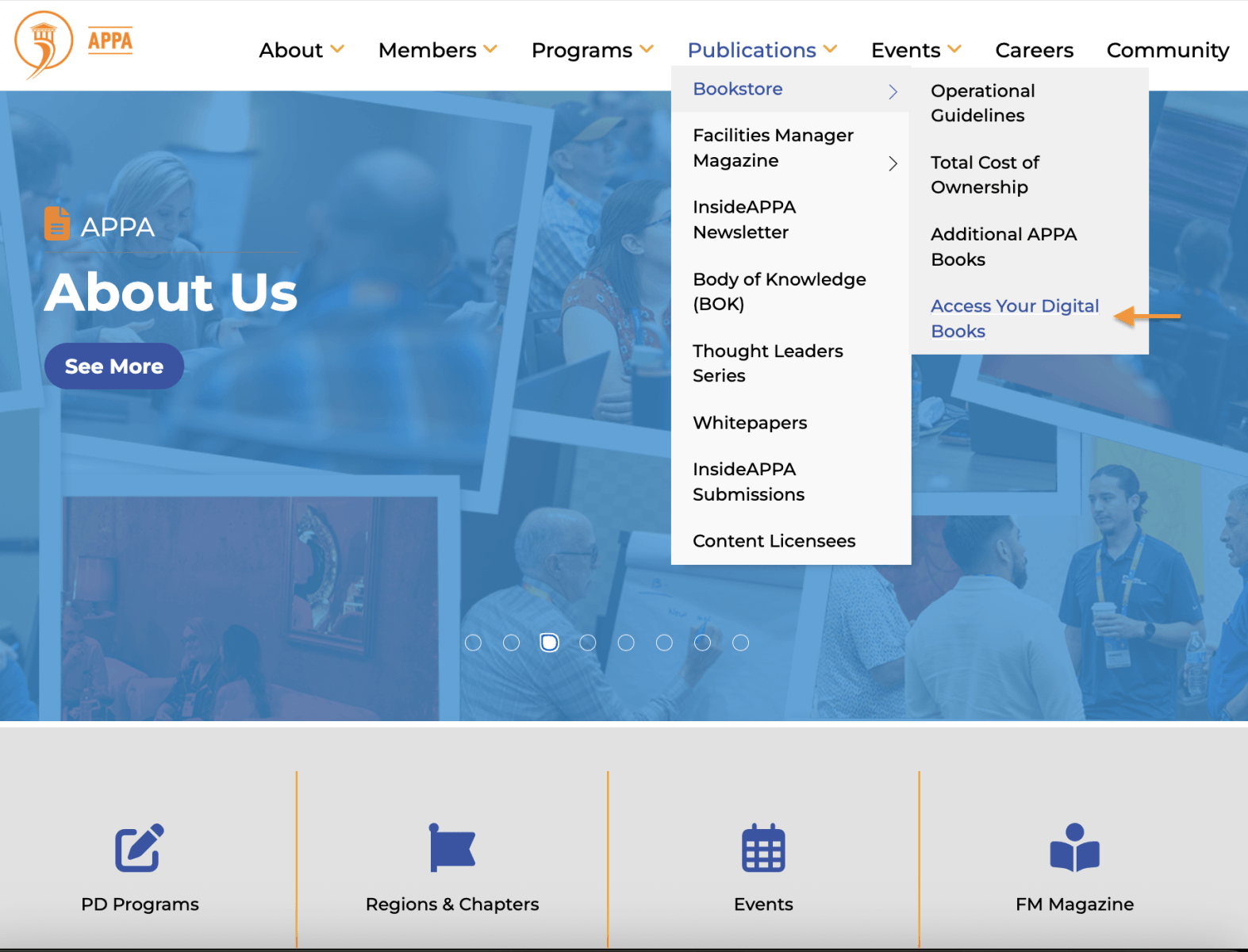
- Select "Access Your Digital Books".
- Select the series you'd like to access (Operational Guidelines, Total Cost of Ownership, or Additional APPA Books).
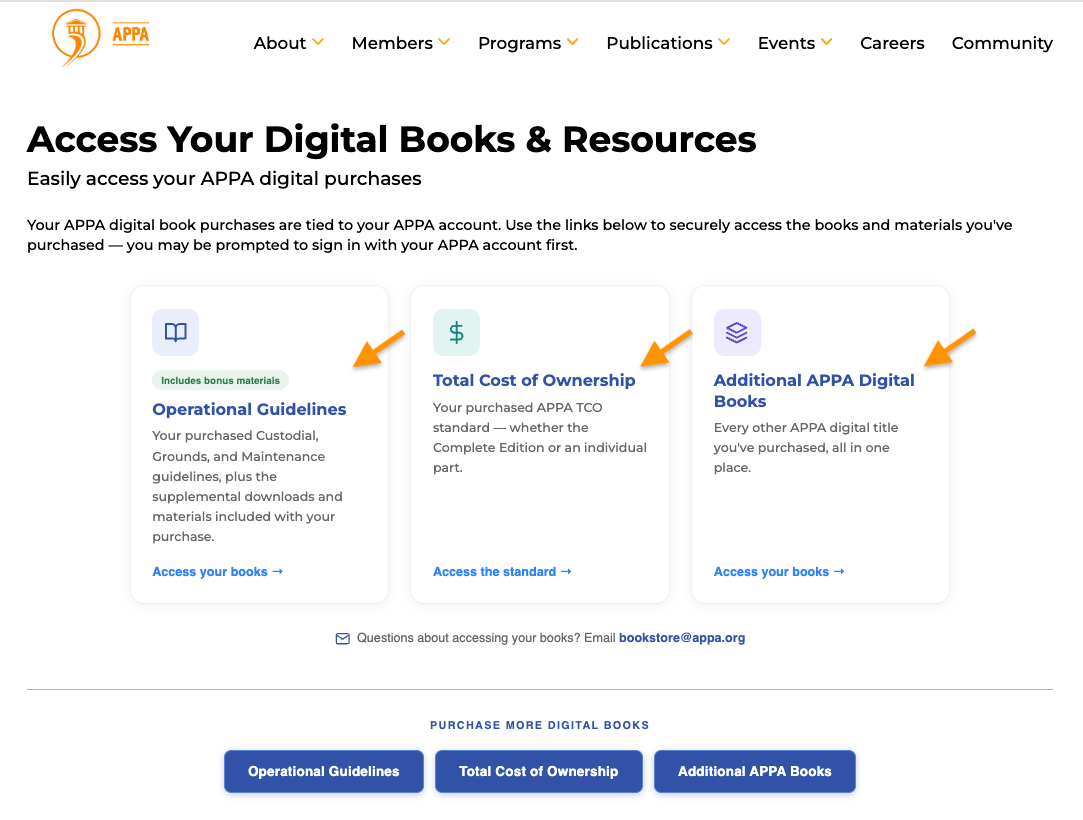
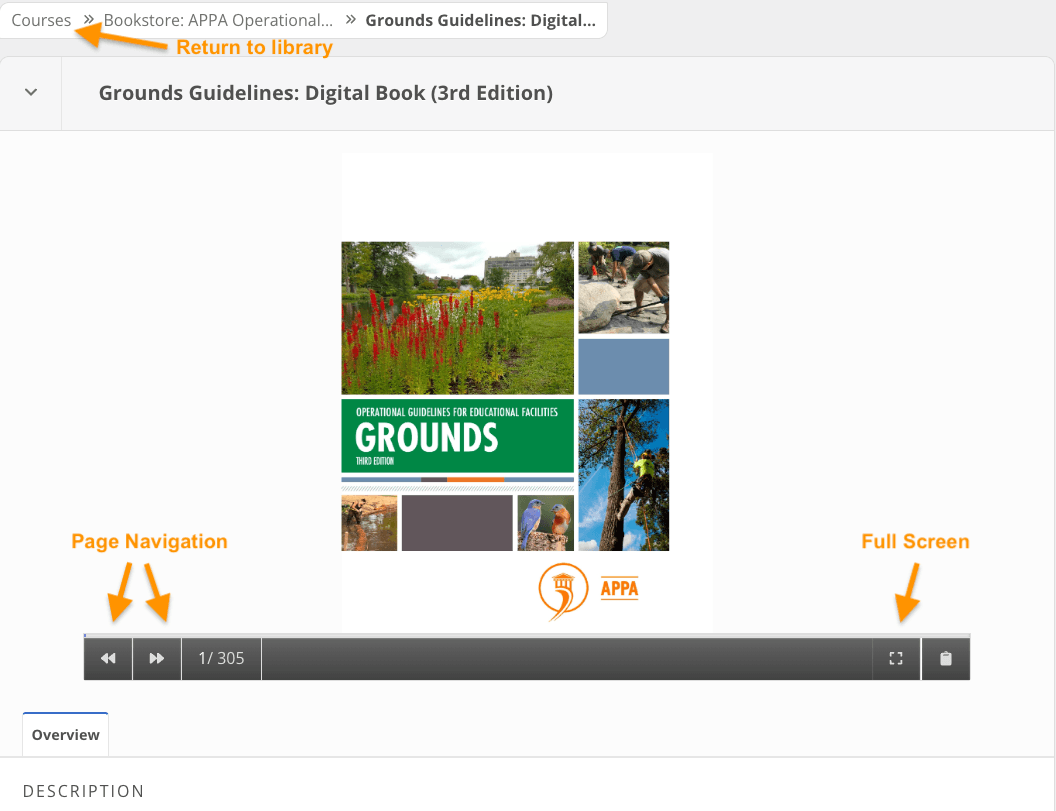
- Select the eBook or Supplemental Materials you'd like to access to launch to viewer.
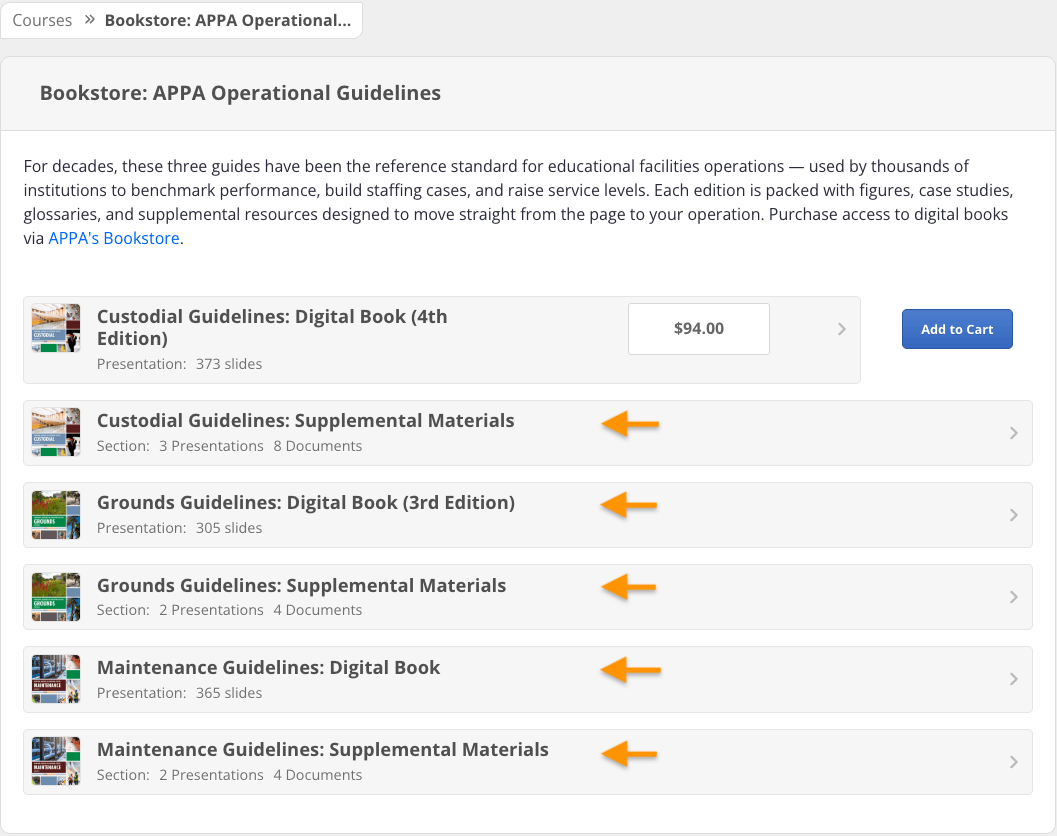
- To return to your digital titles home page, select "Courses".
Bookstore Receipts
Bookstore purchase receipts are available in the Account History tab in Member Compass:
Legacy Access to Digital Titles
If you purchased a book through our legacy myWorkspace platform, those items are still available through the MyWorkspace portal located in your Member Compass:
For Bookstore and publications support, contact:
FPI Reporting & Analytic Data
Purchasing FPI Reports & Data
FPI DATA IS ONLY AVAILABLE TO ORGANIZATIONS WITH A PAID APPA MEMBERSHIP OR PARTICIPATING NONMEMBERS.
FPI data is now accessible through a dedicated FPI portal. Access is restricted to designated accounts only.
Staff approval may be required prior to purchase of FPI data for some membership types. Before beginning the purchase process outlined below, please contact our Analytics team to request approval for purchase.
Our Analytics team may be reached via the link below:
To purchase the FPI report data:
1. From the top menu of any APPA.org web page, select Programs->FPI to visit the FPI landing page.

2. On the landing page, select Purchase Access to be take to the FPI purchase portal.

3. Once at the purchase page you will see pricing corresponding to your membership tier as well as options to assign access to the report to members of your staff roster. If a member is not given access to the report, they will not be able to view it.

Once purchased, those who were provided access will be able to view the report on the FPI landing page. See instructions below for accessing purchased FPI report data.
Accessing FPI Reports & Data
FPI data is now accessible through a dedicated FPI portal. Access is restricted to designated accounts only.
To access your FPI resources:
1. From the top menu of any APPA.org web page, select Programs->FPI to visit the FPI landing page.
2. From the FPI landing page, you may choose to see your results, compare your institution against peer data, and more:

3. There are 3 ways to access FPI Data via a summary document, detailed reports, or the dashboard:


If no FPI reports are available, you may need to have access granted. Contact our Analytics Team at the link below to learn more:
For questions about FPI data and analytics, contact:
MyWorkspace Access Issues
If you are unable to access your digital assets or reports:
1. Please visit the link below to reset your login:
2. Then log back in to your Member Compass:
3. Select the myWorkspace button to access the FPI, digital titles, and Job Express pages.
APPA Thought Leaders Series
Available to all APPA Members, APPA's Thought Leaders Series is now accessible through the direct link located under the Publications drop down menu at the top of any APPA.org webpage.
To access the Thought Leaders Series:
- Log in to your Member Compass via www.appa.org/login.
- Visit the APPA Thought Leaders Series via the link below or the "Thought Leaders Series" drop-down under "Publications" on any www.APPA.org web page.
- Select "Access Thought Leaders Library", then the series you'd like to view.
- A viewer will pop up with your selected Series.
- To return to your digital titles, select "Courses".
Having trouble viewing the series? We recommend logging out and logging back in to your Member Compass.
Access is restricted to logged in accounts with active memberships. Membership status details are available in the Profile tab of Member Compass.